Welcome to Custom Chat: Your Voice, Your Style!
The world of Roblox communication has undergone a significant transformation with the mandatory migration to the TextChatService, a platform-wide renewal that has opened up unprecedented possibilities for in-game interaction. For new players diving into a game like Custom Chat, where communication and self-expression are at the core of the experience, understanding this updated system is key to fast progression and a truly personalized journey. This guide will walk you through the essentials of Custom Chat, from your first message to mastering advanced communication features, ensuring you make the most of the TextChatService renewal.
In Custom Chat, your progression isn't just about collecting items or leveling up combat skills; it's about refining your digital voice and making your presence known through unique chat styles, custom commands, and exclusive channels. The recent TextChatService update has empowered developers to create richer, more dynamic chat environments, which translates directly into exciting new ways for players to interact and progress. Whether you're looking to stand out with a vibrant chat tag or coordinate with friends in a private channel, Custom Chat offers a social sandbox where your communication skills are your greatest asset.
Starting Strong: Your First Steps in Custom Chat
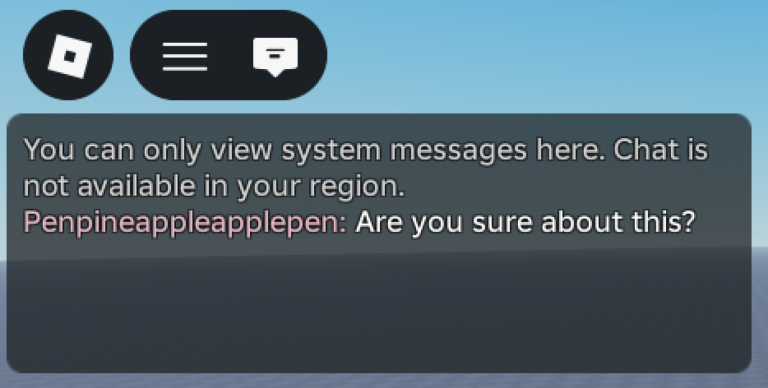
As a new player, your initial focus in Custom Chat should be on familiarizing yourself with the fundamental communication tools and understanding the basic customization options available. The game leverages the robust TextChatService, which inherently provides a solid foundation for interaction, including automatic filtering and moderation to maintain a safe environment.
Mastering Basic Chat Customization
Upon entering Custom Chat, take a moment to explore the default chat interface. While the core functionality is straightforward, the game offers immediate opportunities for personalization. Look for settings that allow you to adjust your chat window's appearance, such as background transparency or text font. Even subtle changes can make your chat experience more comfortable and visually appealing. Experiment with different font sizes and colors to find a style that suits you. This early customization not only enhances your personal experience but also sets the stage for more advanced unlocks later on.
Understanding Default Commands and Emojis
The TextChatService supports built-in chat commands and emoji shortcodes, which are essential for efficient communication. Familiarize yourself with common commands, often prefixed with a slash (/), that might be available from the start. These could include simple emotes or utility functions. Similarly, learn to use emoji shortcodes (e.g., :smile: for 😊) to add flair and expressiveness to your messages without disrupting the flow of conversation. Integrating these into your daily chat will make you a more effective communicator and prepare you for unlocking more powerful custom commands.
The Progression Loop: Evolving Your Digital Voice
Progression in Custom Chat is deeply intertwined with enhancing your communication capabilities and personalizing your chat identity. As you engage with the community, participate in events, and complete in-game objectives, you'll earn currency or experience points that can be invested in a variety of chat-centric upgrades.
Unlocking Unique Chat Tags and Colors
One of the most sought-after forms of progression is the ability to acquire unique chat tags and custom text colors. These aren't just cosmetic; they signify your achievements, roles, or status within the Custom Chat community. For instance, you might unlock a 'Veteran' tag after a certain amount of playtime, or a 'Creator' tag by contributing to community events. These tags often appear as prefixes next to your name, making your messages instantly recognizable. Investing in distinct text colors further allows you to stand out, making your important messages pop in a busy chat feed.
Accessing Advanced Custom Commands
Beyond the default commands, Custom Chat offers a suite of advanced custom commands that can significantly impact your interactions. These might include commands to temporarily change your character's size (like the /super or /mini examples seen in developer documentation), trigger special visual effects, or even initiate mini-games within chat. Unlocking these commands often requires reaching specific progression milestones or purchasing them with earned currency. Mastering their use can give you a strategic advantage in social scenarios or simply add a layer of fun to your daily interactions.
Creating and Joining Custom Channels
A pinnacle of progression in Custom Chat is the ability to create or gain access to exclusive custom channels. These channels can serve various purposes, from private group chats for friends to dedicated spaces for specific in-game activities or role-playing scenarios. Joining a well-established channel can provide access to valuable information and a close-knit community, while creating your own allows you to curate a unique social space. Progression in this area often involves demonstrating leadership, earning trust, or investing significant in-game resources.
How Code Redemption Enhances Your Chat Progression
While we cannot list specific codes or their rewards, understanding how code redemption generally fits into your Custom Chat progression is crucial. Codes, when available, are designed to give players a boost, often providing in-game currency, experience points, or exclusive cosmetic items directly related to chat customization. These rewards can accelerate your journey towards unlocking that coveted chat tag, a unique text color, or even a rare chat command.
Always keep an eye out for opportunities to redeem codes, as they offer a valuable shortcut in your progression. They are a fantastic way to quickly acquire resources that might otherwise take time to earn through regular gameplay, allowing you to personalize your chat experience faster and explore more advanced features sooner.
Game-Specific Mistakes to Avoid for New Players
To ensure a smooth and enjoyable experience in Custom Chat, new players should be mindful of a few common pitfalls that can hinder their progression and social standing.
- Ignoring Customization Options: One of the biggest mistakes is sticking to the default chat settings. Custom Chat is all about personalization. Failing to explore and utilize the available chat window configurations, message appearances, and unlockable tags means you're missing out on a core aspect of the game's progression and identity building.
- Underutilizing Custom Commands: Many players overlook the power of custom commands. These aren't just for show; they can provide unique interactions, shortcuts, or even strategic advantages. Not learning and actively using the commands you've unlocked means you're not fully engaging with the game's mechanics.
- Neglecting Chat Etiquette: While Custom Chat offers extensive customization, it's still a social environment. Disregarding general Roblox chat etiquette, such as spamming or using inappropriate language (which Roblox's TextChatService actively filters), can lead to negative interactions and potential moderation, hindering your ability to progress and connect with others.
- Not Engaging with Channels: Custom channels are designed to foster community and specialized interactions. Avoiding them means you might miss out on valuable social connections, exclusive events, or information shared within specific groups.
FAQ: Your Custom Chat Questions Answered
Q: How do I change the color of my chat messages in Custom Chat?
A: To change your chat message color, you'll typically need to access the customization menu within the game, often found through a dedicated UI button or a specific in-game vendor. Here, you can spend earned currency or experience to unlock new text colors and apply them to your messages. Some special roles or achievements might also grant unique color options.
Q: Can I create my own private chat channels in Custom Chat?
A: Yes, creating your own private chat channels is a significant progression milestone in Custom Chat. This feature is usually unlocked after reaching a certain level, accumulating enough in-game currency, or demonstrating community leadership. Once unlocked, you can typically set up a channel, invite specific players, and manage its settings, including its visibility and who can join.
Q: What are chat tags, and how do I get them in Custom Chat?
A: Chat tags are special prefixes that appear next to your username in the chat, signifying your status, role, or achievements within the game. You can acquire them through various means, such as reaching specific progression levels, completing challenging quests, participating in community events, or sometimes by purchasing them with in-game currency. Each tag offers a unique way to express your identity.
Conclusion: Master Your Message, Master Custom Chat
The TextChatService renewal has ushered in a new era for communication-focused experiences on Roblox, and Custom Chat stands at the forefront, offering a rich and dynamic social environment. By focusing on early customization, understanding the progression loop of unlocking unique chat features, and avoiding common mistakes, new players can quickly establish their presence and truly master their digital voice. Dive in, experiment with your style, and connect with the community – your journey to becoming a Custom Chat communication expert begins now!
Active Custom Chat Codes (April 2026)
0 verified codes available for Custom Chat · 21 unverified
This article was researched and generated using AI tools, then reviewed by the RoUniverse editorial team.