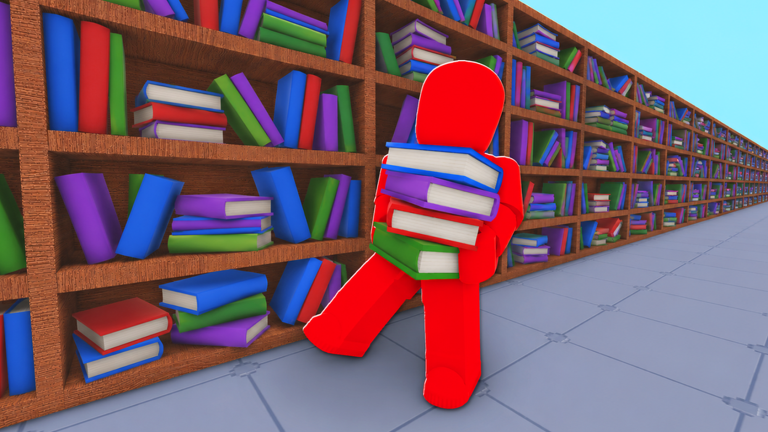
A magical mishap has turned the Grand Roblox Library into complete chaos, and the Head Librarian has one order: no one leaves until every book is back where it belongs. Librarian: Tidy Up Roblox Library drops you into a puzzle sorting experience where the job is to restore 2400 scattered books across endless shelves, hidden corners, and towering archives. Created by Librarian under the Puzzles genre, the game has pulled more than 17.7 million visits, an 82.7 percent approval rating, and a peak of 27,275 concurrent players recorded in June 2026. Sessions average around 13.6 minutes, so the loop is short, repeatable, and built for grinding out upgrades quickly.
This September 2026 guide is written for new players who want a clean onboarding path and fast progression. It also covers where codes will eventually slot into that progression, since this page monitors the game and updates the moment the developer releases anything to redeem.
What New Players Should Focus On First
Before buying anything, learn the controls. E interacts, F drops, and a click places a book. Mobile players get dedicated buttons for the same actions. The game now saves progress, so you are never punished for a short session. The most recent update note attached to the experience is GAME NOW SAVES, which means every shelf you finish carries over between visits.
Your first priority is simple: fill shelves. Each completed shelf counts toward the collection goal of 2400 books, and finishing sets is what opens up classes and better carrying capacity. With a maximum of 12 players per server, you rarely compete for space, so pick a quiet corner of the library and work one section at a time instead of running back and forth across the whole map.
How the Progression Loop Actually Works
- Sort books into shelves. Grab from the pile, carry to the matching section, and place. Repeat until a section is complete.
- Spend what you earn on permanent upgrades. The shop sells Holding Storage at 149, Max Speed at 99, and Max Jump at 29. Storage and speed are the two that shorten runs the most.
- Unlock classes. Archivist Class costs 79, Enchanter Class costs 179, Sage Class and Spellbinder Class each cost 399, and Grand Librarian Class costs 799. Classes are long term goals, not starting purchases.
- Open World 2. Unlock World 2 costs 149 and is the real progression gate, because it doubles the amount of library you can work through.
- Chase badges. One achievement has only a 11.3 percent win rate with roughly 593,528 awards handed out, and a secret badge tied to a five hour session sits at a 10.0 percent win rate. These are the long grind targets.
Once you have storage and speed, the loop accelerates sharply: longer carrying trips, fewer wasted steps, faster shelf completion, and more currency flowing back into the next upgrade.
How Code Redemption Fits Into Progression
There are currently none to redeem for Librarian: Tidy Up Roblox Library. The developer has not issued anything yet, so no rewards can be claimed at this time. When codes are released, they will appear in the live list below, and this page is monitored and updates the moment codes drop.
When redemption does open, the process will follow the standard Roblox pattern:
- Launch Librarian: Tidy Up Roblox Library and let the experience fully load.
- Look for the codes or gift button on the main menu or the in-game shop panel.
- Enter the code exactly as published, then confirm to redeem it.
- Check your upgrade or currency balance to confirm the reward landed.
Codes usually arrive around updates, milestones, and holiday events, and they expire quickly. That is why the live widget matters more than any cached list: a code that was valid yesterday may be rejected today.
Game-Specific Mistakes to Avoid
- Buying classes first. Grand Librarian Class at 799 Robux drains your budget before you have storage or speed. Classes pay off after the basics are in place.
- Ignoring Holding Storage. At 149 it is the single biggest throughput upgrade, because you make fewer trips per shelf.
- Sleeping on Max Speed. At 99 Robux it is cheap and it stacks with carrying capacity to cut travel time across the towering archives.
- Skipping World 2. Unlock World 2 at 149 opens new shelves and keeps the 2400 book goal moving instead of stalling.
- Wasting Head Start. The Head Start pass at 99 gives an early lead, but a learned route through the library beats it every session.
- Underestimating Hint and Magic passes. Unlimited Hints and Unlimited Magic both cost 999, so treat them as endgame luxury purchases rather than starter tools.
Frequently Asked Questions
Q: How do I unlock World 2 in Librarian: Tidy Up Roblox Library?
Unlock World 2 is a shop purchase priced at 149 Robux. Buy it once you have Holding Storage and Max Speed, because World 2 only pays off when you can carry more books across longer distances.
Q: Which class should a beginner buy first?
Start with Archivist Class at 79 Robux. It is the cheapest entry into the class system, while Enchanter Class at 179 and the 399 tier classes should wait until your core upgrades are finished.
Q: Does my library progress save between sessions?
Yes. The current update note states GAME NOW SAVES, so shelves you complete and purchases you make carry over the next time you join.
Conclusion
Fast progression in Librarian: Tidy Up Roblox Library comes down to a clean order of operations: learn the E, F, and click controls, fill shelves for steady income, buy Holding Storage and Max Speed, grab Archivist Class, then push into World 2. Keep an eye on the live code list on this page, because the first redeemable drop will show up there the moment it exists. Jump in, restore the archives, and become the ultimate librarian.
Active Librarian: Tidy Up Roblox Library Codes (November 2026)
No verified active codes are available right now for Librarian: Tidy Up Roblox Library.
![1 Jump Crunchy ASMR Escape!: Build Path and Common Mistakes for the [UPDATE] Trampolines Push (October 2026)](https://tr.rbxcdn.com/180DAY-c4b9d71f8525bf627ecf625bd3c0cb47/768/432/Image/Png/noFilter)