Introduction: a creative sandbox with live-service pressure
Make a Cartoon! puts you in the director's chair of your own animated short, and as of November 2026 the experience is built around a very simple promise: pick a scene, drop in cast and props, animate the actors, press play, and push the finished cartoon toward a bigger audience. The result is one of the more unusual Roblox experiences right now, because the fun is not in survival or combat, it is in producing something and then watching it perform. This review looks at how the game feels in its current state for new players and returning players alike, with attention to the scene system, animation tools, progression toward Stars, and the overall health of the live service.
How Make a Cartoon! feels right now
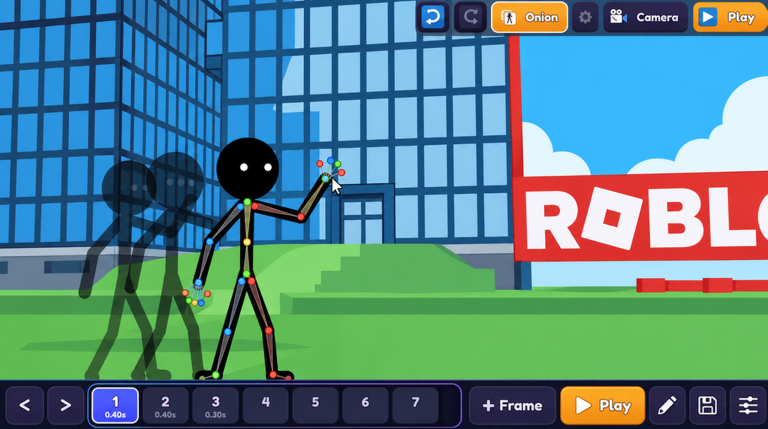
The first minute sets the tone. You start a new cartoon, and the very first decision is the scene. Changing the scene changes the whole feel of the piece, so the game asks you to think like a writer before it asks you to think like an animator. From there the workflow is tactile and immediate: you select a character, and if the camera is currently selected you simply unselect it and reselect the actor you want to work with. That small detail matters, because the camera is its own selectable object and it can interrupt your editing flow if you forget to switch off it.
Once a character is selected, the animation menu opens up and the game starts to feel genuinely expressive. Characters can back flip, hop forward, laugh, sit down, breathe, repeat an action, and run across the stage. Setting an actor to run and then hitting play lets you watch the sequence back instantly, which turns the whole process into a fast loop of edit, preview, refine. It is a satisfying loop for anyone who enjoys tinkering, and it is forgiving enough that a first-time creator still ends up with something watchable.
Content depth: players, animals, props, and animation variety
Depth here comes from the toolbox rather than from a long list of modes. The add menu lets you place players, animals, and props into the scene, and mixing those categories is what separates a plain character showcase from an actual cartoon. Animals add comedic potential, props give the scene landmarks to move around, and multiple players let you stage interactions instead of a solo performance.
The animation list is the other pillar of content. Between movement options like back flips, forward hops, and running, and idle or expressive options like laughing, sitting, breathing, and looping repeats, there is enough variety to build several distinct beats inside one cartoon. The repetition flag in particular is useful for turning a single action into a sustained gag rather than a one-off flourish. Where the game is thinner is in structural variety: the core loop of scene, add, animate, play is the same every session, so your own creativity is doing most of the heavy lifting.
Update quality and live-service health
Make a Cartoon! is a live-service title, and its health in November 2026 reads as steady rather than explosive. Coverage of the game circulating right now centers on guides for controls, tips for going viral, and how to earn Stars quickly, which tells you the community is still invested in optimising the progression side rather than asking for a reinvention. That is a decent sign: players are engaging with the existing systems deeply instead of begging for a new mode to rescue the game.
The weak point is transparency. There is no publicly documented update cadence to point to, and the code infrastructure around the title is essentially dormant, with nothing issued to redeem at the time of writing. This page is monitored and updates the moment codes drop, so returning players checking back will see any new additions as soon as they appear.
Fairness and grind balance
The Star economy is the metric that matters for fairness. Everything in Make a Cartoon! feeds into going viral and accumulating Stars, and the guide material circulating in November 2026 is heavily focused on earning Stars fast, which implies the default pace is slow enough that players feel the need to optimise it. That is a familiar live-service signature: the tools are free to use, but the reward curve encourages either patience or shortcuts.
The encouraging part is that the most reliable shortcut is skill, not spending. A well staged scene with a smart camera angle, varied animations, and props placed with intent is simply a better cartoon, and better cartoons are the ones that go viral. Nothing in the observed feature set forces a purchase to participate, and the entire creation toolkit, from scene switching to animation assignment, is available from the start. The pressure is reputational rather than financial, which is about as gentle as a Roblox progression loop gets.
Social and community strengths
Cartoons are inherently shareable, and that is the quiet strength of this design. Because the output is a performance you can play back on demand, the game gives you something to show friends rather than just a score. Community content around Make a Cartoon! leans into teaching, with detailed walkthroughs of every control and animation option, which suggests a player base that enjoys onboarding newcomers instead of gatekeeping. For a creative title, that culture matters more than raw player counts.
Frequently asked questions
Q: What do you actually do in Make a Cartoon!?
You start a new cartoon, choose a scene, add players, animals, and props, then select each actor and assign animations such as back flip, forward hop, laughing, sitting, breathing, running, or a repeating action. Pressing play previews the finished sequence.
Q: Is Make a Cartoon! friendly to new players in November 2026?
Yes. The scene picker and add menu are presented before anything complex, and the animation workflow is a simple select, assign, preview cycle. The main learning curve is creative rather than mechanical, and the camera being its own selectable object is the one control quirk worth knowing before you start.
Q: Can I redeem anything in Make a Cartoon! at the moment?
There are currently none to redeem, and no rewards can be claimed yet for Make a Cartoon!. When new codes are released, they will appear in the live list below.
Q: Is the Star grind pay to win?
Nothing observed forces spending. Stars come from cartoons that go viral, and the quality factors you control, including scene choice, cast variety, props, and animation variety, are all free to use.
Verdict: who Make a Cartoon! is best for
Strengths: a clear and immediate creative loop, a genuinely varied animation menu, scene and prop variety that supports real staging, instant playback for fast iteration, and a fair progression system where skill beats spending.
Weaknesses: a single core loop with little structural variety between sessions, camera selection that can interrupt editing, a slow default Star pace that pushes players toward optimisation, and thin transparency around update timing and code support.
Make a Cartoon! is best for Roblox players who want to make something and show it off, rather than climb a leaderboard for its own sake. If you enjoy dollhouse style creativity, animation tinkering, or short form comedy staging, the November 2026 build will hold your attention. If you need tightly structured modes, a fast reward cadence, or a deep meta to theorycraft, the lean content roster may feel thin. The honest verdict is a solid recommendation with an asterisk: the tools are strong, the variety is on you, and the live service still has room to prove its update rhythm.
Active Make a Cartoon! Codes (November 2026)
No verified active codes are available right now for Make a Cartoon!.