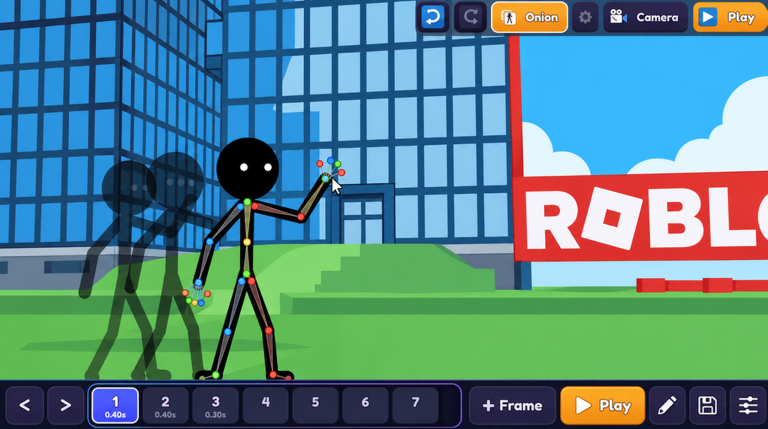
Make a Cartoon! has built its audience on a simple promise: turn a few drawn frames into a cartoon you can show other players. That loop lives or dies on the interface. In the November 2026 update window, the conversation around Make a Cartoon! has been less about a headline feature and more about the small, unglamorous work that keeps a creation game playable: menus that respond, tools that land where you expect them, and sessions that do not end with lost work.
This breakdown looks at the quality of life and user experience side of the current patch cycle, why those changes matter even when nothing flashy ships, and where players should look first when they next open the game.
Why Quality of Life Updates Matter Without Headline Features
A creation tool is judged in the minutes between opening it and getting an idea onto the canvas. Every extra click, every misplaced panel, every unclear button is paid for in creative momentum. For Make a Cartoon!, where the core activity is drawing frames, previewing motion and publishing the result, an update that only tightens the interface still changes how much a player gets done in one sitting.
That is why patch cycles like the November 2026 one deserve attention even without a new mode or item. Players who bounce off a clunky menu rarely file a bug report; they simply open the game less often. Quality of life work quietly protects the reason people came back in the first place.
Interface and Control Improvements to Check First
When you load Make a Cartoon! after this update, start with the creation flow itself and watch for friction in the places the game leans on constantly:
- Frame and tool selection: the steps between picking a drawing tool, moving between frames, and previewing playback should feel shorter and more predictable, with fewer accidental tool switches.
- Menu layout and navigation: creation options, publishing controls and settings should be reachable without digging through overlapping panels, so a session spends more time drawing and less time searching.
- Input and camera handling: placing strokes, scrolling a longer cartoon and confirming an action should register the first time, since a delayed or misread input in a drawing tool reads as a broken tool.
- Save and publish feedback: clear confirmation that a cartoon has been stored or posted removes the guesswork that makes players redo work they already finished.
Bug Fixes That Affect Daily Play
Not every fix in a patch like this is visible in a changelog line, but the ones players feel are the ones tied to the everyday loop: a frame that did not persist, a preview that stalled, a menu that would not close, or a session that behaved differently after switching between editing and viewing. In a game where progress is hand drawn, any instability around saving is effectively a content loss, which is why stability fixes carry more weight here than in most games.
After updating, it is worth running a quick sanity pass: draw a few frames, preview the cartoon, exit and re-enter, and confirm the work is still there. That two minute check tells you more about the health of your save than any list of notes.
Accessibility and Comfort Additions
Accessibility in a drawing game is largely about control over how the tool behaves. Look for adjustments to interface scale, clearer contrast on active tools, less punishing default timing, and options that reduce how precisely a player must click to keep working. Anything that lowers the physical and visual cost of a long editing session makes Make a Cartoon! usable by more people, and makes existing players more willing to sit down for a longer build.
What Players Are Saying
Public reaction threads and community posts around this update cycle were not available in the research gathered for this article, so no direct quotes are reproduced here. What can be said honestly is the shape of the discussion pattern for creation games like Make a Cartoon!: sentiment tracks whether a patch respects the player's time. Quality of life changes tend to be received well when they shorten the route from idea to finished cartoon, and poorly when they alter familiar controls without an obvious gain. Players should judge this patch the same way, by testing whether their normal session now takes fewer steps, not by the size of the announcement.
FAQ
Q: Does the November 2026 Make a Cartoon! update change how I save my cartoons?
Quality of life patches in the game generally focus on making saving and publishing feedback clearer rather than overhauling the system. After updating, draw a few frames, preview them, then rejoin the game to confirm your cartoon is still intact before starting a long session.
Q: Will my existing cartoon projects be affected by the interface changes?
Interface updates are meant to change how you reach controls, not what you have already made. Your finished and in progress cartoons should remain as you left them, so back up anything important by publishing it before exploring new menu layouts.
Q: What should I test first after installing the Make a Cartoon! patch?
Run through the core loop once: pick a drawing tool, create several frames, use the preview to check the motion, then save and rejoin. If each of those steps works smoothly, the quality of life changes are doing their job for your play style.
Conclusion
The November 2026 update cycle for Make a Cartoon! is a reminder that in creation games, the interface is the gameplay. Shorter menus, dependable saves, honest feedback and comfortable controls decide whether an idea becomes a cartoon or gets abandoned halfway. Test the patch with a normal session rather than a feature hunt, and let the number of steps between you and a finished cartoon be your verdict.
Active Make a Cartoon! Codes (November 2026)
No verified active codes are available right now for Make a Cartoon!.