Building Your Boba Empire: Optimizing Code Claims with Weekly Updates in May 2026
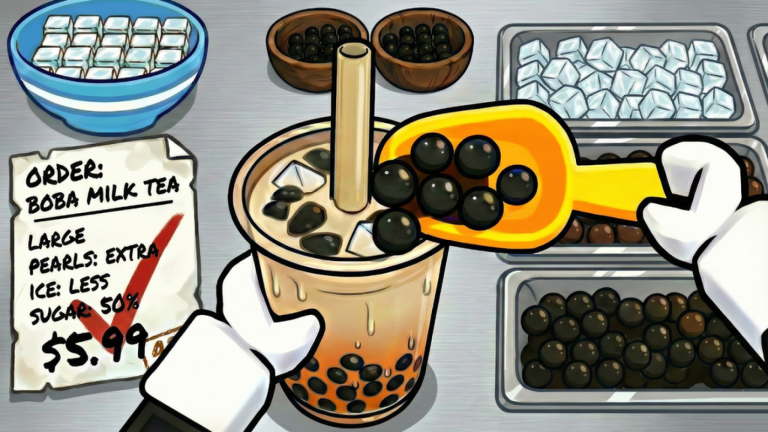
Welcome, aspiring boba tycoons! In the bustling world of Roblox's My Boba Store, the path to creating a flourishing bubble tea empire is an exciting one, filled with the joy of crafting delicious drinks and expanding your shop's reach. As you strive for success, a vital component for accelerating your progress comes in the form of promotional codes. These valuable freebies provide essential in-game resources, such as Cash and powerful Cash Potions, giving you a significant edge in your entrepreneurial journey. With the game's consistent schedule of weekly updates, staying informed about new code drops is paramount to maximizing your rewards and truly optimizing your boba business in May 2026.
The developers, Habit Games, are known for their active engagement with the community, frequently releasing new content and opportunities for players to enhance their gameplay. Understanding the rhythm of these updates and the best practices for code redemption can transform your boba stand into a thriving enterprise much faster. This guide will walk you through how codes seamlessly integrate into your progression, where to reliably find new announcements, the swift redemption process, and how to troubleshoot common issues to ensure you never miss out on a valuable boost.
How Code Rewards Impact Your Boba Store Progression
Codes in My Boba Store are more than just freebies; they are strategic tools that significantly impact your game progression, especially in the early to mid-game stages. The primary rewards from these codes often include in-game Cash and Cash Potions. Cash is fundamental for purchasing new boba stands, upgrading existing ones, and expanding your shop's footprint. Without sufficient cash, growth can be a slow grind, relying solely on customer sales.
Cash Potions, on the other hand, offer a temporary but potent boost to your earnings. These potions increase the amount of money you receive from every customer for a limited duration. This means that while a potion is active, your boba stands generate cash at an accelerated rate, allowing you to accumulate wealth much faster. This accelerated earning potential translates directly into quicker upgrades, enabling you to unlock more efficient boba stands, hire better workers, and expand into new plots sooner. For new players, these boosts are particularly crucial, providing a quick way to gain momentum and overcome the initial challenges of establishing a successful boba business. By strategically redeeming and utilizing these rewards, players can reduce the time spent grinding and instead focus on the more enjoyable aspects of designing and managing their dream boba shop.
Reliable Sources for New Code Announcements
Staying ahead of the curve with new code releases is essential for maximizing your free rewards. Many players might miss out because they are not aware of the primary channels where the developers, Habit Games, announce them. The most reliable sources for new My Boba Store codes include:
- The Official Habit Games Roblox Group: Developers frequently post updates and special announcements, including new codes, directly to their Roblox group page. Joining this group can also offer exclusive in-game perks and keeps you connected to the developer's announcements.
- The Habit Games Discord Server: Joining the official Discord server is often the best way to get the earliest hints and direct announcements about new promo codes. It also provides a vibrant community space to engage with other players, share strategies, and stay connected with game developments, often through a dedicated 'game-news' channel. This is often where codes are dropped first.
- The Game's Roblox Page Description: The My Boba Store game page itself often contains active codes or mentions upcoming code releases, especially for milestone rewards like 'CODE AT 1000 LIKES!'. Regularly checking this description can yield unexpected rewards and is a quick way to verify currently active codes.
Regularly checking these official channels ensures you are always in the loop and can redeem codes before they potentially expire, giving your boba shop a significant boost.
The Seamless Code Redemption Process in My Boba Store
Redeeming codes in My Boba Store is a straightforward process, designed to get you back to serving customers and managing your shop without delay. To claim your free rewards, simply follow these steps:
- First, launch My Boba Store on the Roblox platform and load into your personal shop area.
- Once you are in your store, direct your attention to the gear icon, which represents the settings menu. This icon is typically located in the bottom-left or bottom-right corner of your screen. Click on it to open the settings interface.
- Within the settings menu, you will find a dedicated 'Codes' button. Click this button to bring up the code redemption interface.
- A text box labeled 'Enter Code' will appear. Carefully type or paste your active code into this box. It is crucial to ensure the code is entered exactly as it appears, paying close attention to capitalization and any special characters, as codes are case-sensitive.
- Finally, click the 'Claim' or 'Redeem' button to process your code.
If successful, a confirmation message will appear, and your rewards will be instantly added to your in-game inventory, ready to be used to enhance your boba business. This quick and easy process ensures that you can claim your boosts and get back to managing your shop efficiently.
Signs a Code May Be Expired or Not Working
While developers strive to provide valuable codes, they don't last forever. Understanding why a code might not work can save you time and frustration. Here are common signs and reasons a code may be expired or invalid:
- Case-Sensitivity and Typos: The most frequent reason a code fails is incorrect entry. Codes are almost always case-sensitive, meaning 'welcome' is different from 'Welcome'. Double-check for any typos, extra spaces before or after the code, or incorrect capitalization.
- Expiration: Codes are often released for a limited time, tied to specific events, milestones, or updates. Once their validity period ends, they expire and can no longer be redeemed. While My Boba Store is relatively new and some sources indicate few expired codes currently, this can change rapidly with frequent updates.
- Already Redeemed: Each code can typically only be redeemed once per account. If you've used a code before, it won't work again.
- Server Issues: Occasionally, a newly released code might only function correctly on newer game servers. If a code isn't working, exiting the game and rejoining a different server can sometimes resolve the issue.
- Outdated Information: Relying on unofficial or outdated sources for codes can lead to frustration. Always prioritize official channels like the Habit Games Discord or Roblox group for the most current and reliable codes.
If you encounter a code that isn't working, carefully re-enter it, check official sources for its status, and consider restarting your game to join a fresh server.
Frequently Asked Questions About My Boba Store Codes
Q: How do Cash Potions from codes help my Boba Store progression?
A: Cash Potions obtained from codes provide a temporary boost to the amount of money you earn from every customer in My Boba Store. This accelerated income allows you to purchase upgrades, new boba stands, and expand your shop much faster, significantly speeding up your overall progression and reducing the need for extensive grinding.
Q: Where are the most reliable places to find new codes for My Boba Store?
A: The most reliable places to find new codes for My Boba Store are the official Habit Games Roblox Group, the Habit Games Discord server, and the game's official Roblox page description. These are the primary channels where developers announce new codes, often coinciding with game updates or community milestones.
Q: Why might a code I entered in My Boba Store not be working?
A: A code in My Boba Store might not be working for several reasons, including incorrect entry (codes are case-sensitive and require exact spelling), expiration due to time limits, or because you have already redeemed it on your account. Sometimes, new codes may also only work on fresh servers, so rejoining the game can occasionally resolve the issue.
Conclusion
In My Boba Store, codes are a fantastic resource for any player looking to quickly build and expand their boba tea empire. By understanding how these valuable rewards, particularly Cash and Cash Potions, accelerate your progression, and by knowing exactly where and when to look for new releases, you can significantly optimize your gameplay. Habit Games' commitment to weekly updates means a continuous stream of potential new codes, making it crucial to regularly check their official Roblox group, Discord server, and the game's description. By diligently following the simple redemption steps and troubleshooting common issues, you'll ensure that you're always leveraging every available boost to make your boba store the most successful in Roblox. Keep serving those delicious drinks, stay updated, and watch your business flourish!
This article was compiled by the RoUniverse automation pipeline in May 2026 using publicly available sources and is kept up to date as new information becomes available.
Active My Boba Store Codes (May 2026)
0 verified codes available for My Boba Store · 5 unverified
This article was researched and generated using AI tools, then reviewed by the RoUniverse editorial team.