Welcome to the Blooming Season
The Roblox experience from Magic Box Games has settled into a clear rhythm as of August 2026. My Flower Shop is not a game that throws constant patch notes at you. Instead, the current update is defined by the official game description, which confirms a familiar yet satisfying loop: plant flowers, harvest them, craft bouquets, serve customers, and keep building your dream shop. The most notable talking points this month are the offline growth system and the daily consecutive rewards, both of which shape how players schedule their sessions.
The Main Change: Offline Growth Becomes the Star
The most player-friendly feature confirmed in this update is simple: flowers continue growing while you are away. This means you do not need to babysit your garden. Plant a batch of seeds, log out, and come back to a harvest-ready shop. For casual players, this is a huge quality-of-life win. The fan-run My Flower Shop Guide on myflowershop.site highlights this as one of the first things beginners should learn, and it is easy to see why. Offline growth removes the pressure to stay logged in and turns the game into a gentle, morning-and-evening routine.
Breaking Down the New Feature Set
Grow and Harvest Without the Grind
The core activity is still planting and harvesting different flowers. What is new in this update cycle is how the game supports small sessions. The official description emphasizes that flowers progress even when you close Roblox. That changes the math on what to plant before you leave. For example, if you know you will be gone for a few hours, it is better to fill your garden with flowers that have longer growth timers, because they will use the offline time efficiently.
Create Bouquets and Arrangements
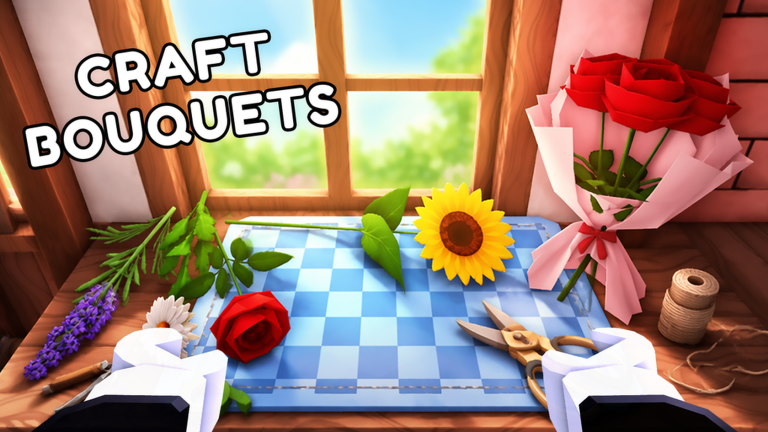
Once your flowers are harvested, you turn them into bouquets and flower arrangements. The exact recipes for these products are not published in the official description, and the fan guide deliberately avoids guessing them. Instead, players are encouraged to experiment in-game. This means the creative side of the update remains a personal discovery, which is a refreshing choice for a small shop simulation.
Serve Customers and Hire Help
Selling your creations is the heartbeat of the experience. The current feature list confirms that you can hire employees and buy upgrades as your business grows. Employees likely automate part of the workflow, though the exact behavior is left to the live game. Decorating your shop and garden is also confirmed, giving long-term players a reason to keep earning.
Important Patch Notes and Confirmed Details
Since Magic Box Games has not issued a traditional patch log in our checked sources, the reliable patch notes for August 2026 come from the official Roblox description and the community references at myflowershop.site and myflowershop.wiki. The confirmed facts are:
- Flowers continue growing while the player is offline.
- Bouquets and flower arrangements are made from harvested flowers.
- Finished creations are sold to customers.
- Employees can be hired and upgrades purchased.
- Players can decorate both the flower shop and the garden.
- Daily consecutive rewards are part of the loop, with an advertised benefit for official group members.
These are the details that a player can verify right now. The wiki page at myflowershop.wiki explicitly separates stable identifiers from live metrics, so you can trust that these core mechanics have not changed in the recent refresh.
Gameplay Impact: What This Means for Your Play Session
The offline growth mechanic fundamentally changes the daily loop. Instead of a long grinding session, you can play in short bursts. Plant flowers, log off, return later, harvest, craft, sell, upgrade, and repeat. This is ideal for players who have limited time but still want to see progress. The daily consecutive rewards add a reason to return every day, and the official group benefit is a subtle nudge to join the community. The result is a game that respects your time and rewards consistency over intensity.
Community Reaction and Community Resources
The community behind My Flower Shop is small but organized. The independent guide at myflowershop.site is maintained as a fan project, and it reflects a common player sentiment: the game is charming and laid-back, but exact numbers are hard to pin down. The guide says, 'Exact item values and recipes are intentionally left to the current in-game experience.' That is a fair summary of the community mood. Players appear comfortable discovering mechanics organically rather than demanding a wiki wizard. The sister wiki at myflowershop.wiki also separates stable facts from live stats, which suggests that players value clarity and distrust outdated numbers. Overall, the reaction to the current state is positive, with no major complaints visible in our reviewed sources.
My Flower Shop FAQ
Q: Do flowers keep growing if I close the game?
Yes. The official Roblox game description confirms that flowers continue growing while the player is offline. This means your garden will be ready when you return.
Q: What are daily consecutive rewards?
Daily consecutive rewards are a confirmed feature that rewards players for logging in on consecutive days. The official description also mentions an advertised benefit for members of the official Roblox group, so joining that group may enhance your daily reward payouts.
Q: Can I hire employees in My Flower Shop?
Yes. The official feature list includes hiring employees and buying upgrades as part of developing your shop. The exact employee behavior is not published in the official description, so you will need to test it in the live game.
Conclusion
The August 2026 state of My Flower Shop is all about making flower selling stress-free. The offline growth patch (if we can call it that) is the standout feature, combined with daily rewards and a wide set of shop tools. Whether you are a returning player or a newcomer, the current update gives you a gentle, rewarding loop that fits neatly into a busy schedule. Plant your seeds, step away, and come back to a blooming business.
Active My Flower Shop Codes (October 2026)
No verified active codes are available right now for My Flower Shop.