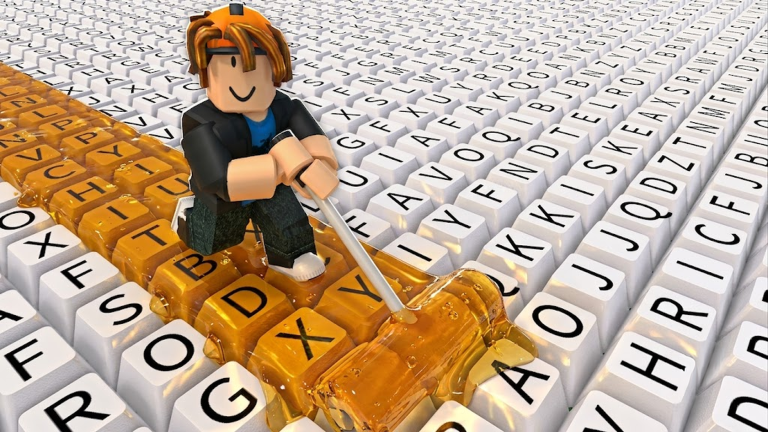
Paint My Keyboard! puts you on a giant keyboard where every painted key earns cash. It is an incremental game at heart: run, paint, collect, upgrade, repeat. For new players, the fastest path forward is not about buying every shiny cosmetic. It is about following a practical build path that starts with cash-focused paints and uses community tools to avoid wasted spending. As of August 2026, no rewards can be claimed yet for Paint My Keyboard! because the code system is not live. This page is monitored and updates the moment codes drop.
What New Players Should Focus On First
According to the Paint My Keyboard Wiki tier list, the strongest starting pick is an S-tier paint upgrade with a cash focus. Cash from painted keys is the verified core reward in the game, so protecting steady earning should be your top priority. After your first paint upgrade, buy a roller upgrade to speed up painting, but do not neglect paints. A good rhythm is one paint upgrade for every roller upgrade until you reach level 3 on both. Use the Paint My Keyboard Calculator before every purchase to compare which upgrade gives the best cash-per-minute return. Avoid cosmetic keyboard colors and RGB-style layouts at first. They do not boost income and will slow down your early run.
How the Progression Loop Works
Each run sends you across the keyboard trail. Every key you paint converts into cash, and that cash is spent on four resource lines: cash paints, value paints, roller upgrades, and keyboard expansion. Cash paints increase the amount of cash each painted key gives you. Better paints and roller upgrades are confirmed unlock paths, while keyboard expansion opens up more keys per run. The tier list labels S-tier for cash focus, A-tier for paint value and painting speed, and B-tier for area growth. That means you should treat expansion as a late purchase. The calculator asks for your current paint tier, roller level, and expansion status, then recommends the next purchase. It is the closest thing the community has to a formula-based optimizer. Special keyboard color schemes are purely cosmetic. They do not affect the loop, so leave them for later.
How Code Redemption Fits Into Progression
Paint My Keyboard! does not have a working code menu yet. Since no rewards can be claimed, code redemption plays no part in the early build path. When the developer adds codes, they will likely appear through the official Roblox group or social media posts. Once that happens, this page will update immediately.
How to Redeem Codes Once They Launch
- Open Paint My Keyboard! on Roblox and enter a server.
- Find the codes icon in the main game menu.
- Type the code exactly as shown, including capital letters and numbers.
- Press Enter or confirm to claim the reward.
Ignore fake code videos and random online lists. They are not grounded in verified sources. The only places you should trust are official announcements and the live list on this page.
Game-Specific Mistakes to Avoid
- Spending cash on keyboard skins before paints: Cosmetics do not increase income and will stall your early progression.
- Upgrading rollers too much before paints: High roller speed without enough cash per key still earns slowly. Keep paints and rollers balanced.
- Expanding your keyboard too early: The cost of unlocking a new row is steep and offsets early gains. Wait until you have at least three paint upgrades.
- Ignoring the community calculator and tier list: These tools save time and cash by showing the optimal next upgrade. Check them before every big purchase.
- Chasing fake codes: Since there are no rewards to claim right now, any video claiming otherwise is likely a trap. Wait for verified drops.
Frequently Asked Questions
Q: What is the best first purchase in Paint My Keyboard!?
A: Start with an S-tier cash-focused paint upgrade. It increases cash per key and gives the strongest early return. After that, alternate with rollers to keep speed and income balanced.
Q: When should I expand my keyboard?
A: Wait until you have at least three paint upgrades and rollers at level 2 or 3. Expansion is B-tier in the community tier list and expensive for early players.
Q: Does the Paint My Keyboard Calculator help with purchases?
A: Yes. It factors in your paint tier, roller level, and expansion status, then suggests the next upgrade that maximizes cash per minute. It is available on the Paint My Keyboard Wiki and is the best way to avoid wasted spending.
Conclusion
Fast progression in Paint My Keyboard! is not about grinding longer. It is about spending smarter. Use the cash-focused paint first, keep rollers balanced, hold off on expansion, and rely on the community tier list and calculator. There are no codes to redeem right now, but when new rewards arrive, the live list below will show them. Focus on the build path, avoid cosmetic traps, and you will build your first efficient keyboard run much faster.
Active Paint My Keyboard! Codes (September 2026)
No verified active codes are available right now for Paint My Keyboard!.