Unearthing Value: Strategic Code Redemption in Pickaxe Tycoon
Welcome, aspiring tycoons, to the world of Pickaxe Tycoon! In this engaging Roblox experience by Popular Marketplace, your journey to building a colossal mining empire hinges on smart resource management and continuous upgrades. While the core gameplay revolves around mining ores, converting them to cash, and merging pickaxes for superior tools, savvy players know that free in-game codes can provide a significant boost to their progression. This guide will delve into how these valuable codes function within Pickaxe Tycoon, where to reliably find them, how to redeem them efficiently, and what to do if you encounter issues, ensuring you maximize every opportunity to grow your fortune.
How Free Rewards Propel Your Pickaxe Tycoon Progression
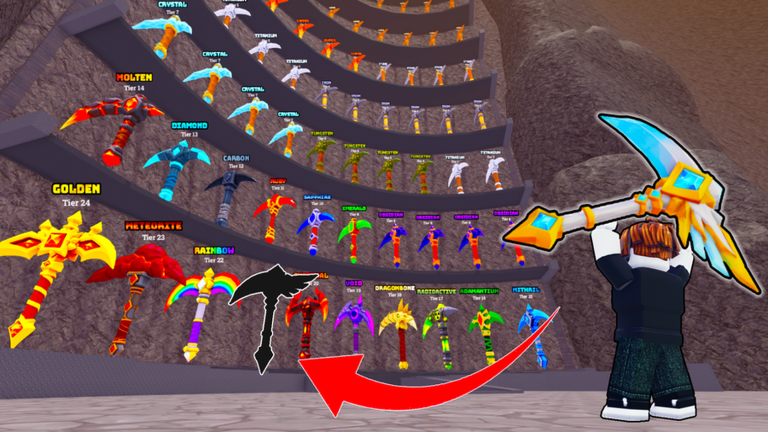
In Pickaxe Tycoon, every advantage counts. The game's loop involves acquiring pickaxes, digging for various ores, selling those ores for money, and then reinvesting that money into better pickaxes, pets, and other upgrades to mine even more efficiently. Codes often grant essential resources such as coins, gems, or temporary boosts like increased mining speed, luck, or damage. These rewards directly impact your ability to progress faster through the game's tiers and unlock new content. For instance, a coin boost can allow you to purchase a higher-tier pickaxe much sooner, dramatically increasing your ore output. Similarly, a luck boost might help you find rarer, more valuable ores, while a speed boost accelerates your overall mining rate. By strategically redeeming codes, players can significantly reduce the grind, allowing them to expand their mining tower, explore new areas, and dominate the leaderboards with greater ease. These freebies are particularly beneficial for new players looking to establish a strong foundation, but even veteran tycoons can leverage them to push past plateaus and optimize their late-game efficiency.
Where to Uncover Official Pickaxe Tycoon Codes
Finding legitimate codes is the first step to optimizing your rewards. For Pickaxe Tycoon, the primary and most reliable source for official codes is typically the game's official Roblox page itself. Developers often update the game description with new codes or provide links to their official social media channels where codes are announced. Players should make it a habit to check the Pickaxe Tycoon Roblox page regularly for any new information or direct code listings.
While many Roblox games utilize external platforms like Discord servers or Twitter accounts for code announcements, the developer "Popular Marketplace" for Pickaxe Tycoon does not explicitly list such external social media links on their official Roblox game page. This means players should focus their search on the game's description and any in-game announcements. If the developer were to introduce external channels in the future, they would likely be linked from the Roblox game page, so always keep an eye out for updates there.
Redeeming Codes Swiftly After Updates
Once you've found a new code, redeeming it quickly is crucial, as codes can sometimes have a limited redemption window or a cap on the number of uses. The process for redeeming codes in Pickaxe Tycoon follows a standard Roblox procedure, similar to many other tycoon games. While the exact button placement can vary slightly between Roblox experiences, you will generally find a dedicated "Codes" or "Shop" button on your screen, often located on the side or bottom of the user interface.
Here's a general step-by-step guide:
- Launch Pickaxe Tycoon on Roblox.
- Look for a "Shop" or "Codes" button on the left or side of your screen.
- Click on this button to open the redemption interface.
- Locate the text box labeled "Enter Code" or similar.
- Carefully type or paste the code into the text box. Remember that codes are often case-sensitive, so ensure correct capitalization and avoid extra spaces.
- Press the "Redeem" or "Submit" button.
- If successful, you will see a confirmation message and receive your in-game rewards instantly.
Being prompt with redemption, especially after game updates, ensures you don't miss out on valuable boosts that can give you an edge in the ever-evolving world of Pickaxe Tycoon.
Identifying Expired or Invalid Codes
Encountering an error message when trying to redeem a code can be frustrating, but understanding the common reasons can help you troubleshoot. The most frequent reasons a code might not work include:
- Typographical Errors: Codes are case-sensitive and often contain a mix of letters, numbers, and special characters. Even a small typo can render a code invalid. Always double-check your entry or, if possible, copy and paste the code directly.
- Expiration: Codes are often released for a limited time or for a specific number of redemptions. Once a code expires or its usage limit is reached, it can no longer be redeemed. Developers typically do not announce when codes will expire, making timely redemption essential.
- Already Redeemed: Each code can usually only be used once per account. If you've previously redeemed a code, you won't be able to use it again.
- Incorrect Game: Ensure you are attempting to redeem the code in the correct game, Pickaxe Tycoon, and not a similar-sounding title like Pickaxe Simulator, which has its own distinct set of codes and developer.
If you receive an "Invalid Code" message, first verify your spelling. If it's still not working, it's highly probable that the code has expired. Keeping an eye on the game's official Roblox page for the latest information is your best defense against missing out.
Frequently Asked Questions About Pickaxe Tycoon Codes
Q: How often does Popular Marketplace release new codes for Pickaxe Tycoon?
A: The frequency of new code releases for Pickaxe Tycoon can vary. Players should regularly check the game's official Roblox page description for any announcements or direct code listings, as this is the primary channel for the developer, Popular Marketplace, to share such information.
Q: What kind of rewards can I expect from Pickaxe Tycoon codes?
A: Codes in tycoon games like Pickaxe Tycoon typically offer valuable in-game resources such as coins, gems, or temporary boosts. These boosts can include increased mining speed, luck for finding rare ores, or enhanced damage, all of which accelerate your progression and help you upgrade your pickaxes and facilities faster.
Q: Is there a specific in-game area where I need to be to redeem codes in Pickaxe Tycoon?
A: Generally, you can redeem codes from almost anywhere within the game's lobby or main interface. Look for a prominent "Shop" or "Codes" button on your screen, usually located on the side, which will open the redemption window. There isn't typically a specific physical location you need to visit within your tycoon base to enter codes.
Conclusion
Codes are a fantastic way to enhance your Pickaxe Tycoon experience, offering free boosts and resources that can significantly accelerate your journey to becoming the ultimate mining magnate. By understanding where to look for official announcements, how to redeem codes efficiently, and the common reasons for redemption failures, you can ensure you're always optimizing your gameplay. Remember to frequently check the official Pickaxe Tycoon Roblox page for the latest information, and be swift in claiming your rewards to keep your mining operation thriving. Happy digging, tycoon!
This article was compiled by the RoUniverse automation pipeline in May 2026 using publicly available sources and is kept up to date as new information becomes available.
Active Pickaxe Tycoon Codes (May 2026)
0 verified codes available for Pickaxe Tycoon · 2 unverified
This article was researched and generated using AI tools, then reviewed by the RoUniverse editorial team.