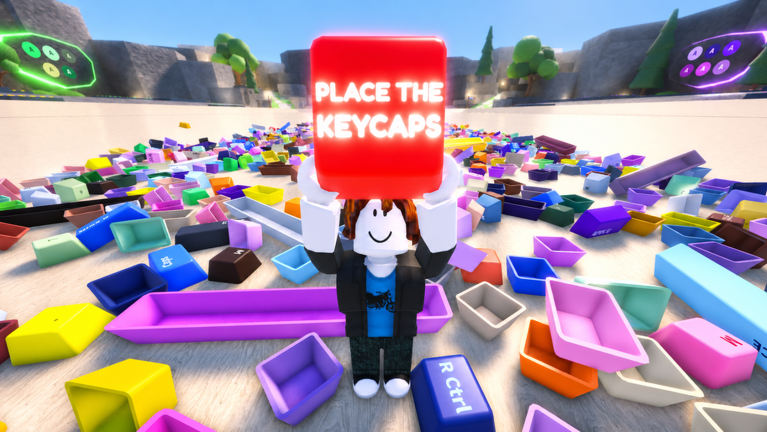
Welcome to Place the Keycaps!, the chaotic sorting puzzle from developer KEYBOARDS!!!!! that turns scattered keycap piles into complete keyboard collections. Still in beta, this Roblox experience has already drawn more than 1.9 million visits and over 21,000 favorites, so you are far from alone in trying to master the art of fast, accurate sorting. The developer has been clear about the game's state: "This game is in beta, expect bugs and tweaks. FEEDBACK IS APPRECIATED!!" That means today is a perfect time to learn the fundamentals before the difficulty curve sharpens.
Codes are a frequent question for any popular Roblox game. Right now, there are currently none to redeem for Place the Keycaps!, and no in-game code redemption system has been confirmed by the developer yet. When the developers release any codes, they will appear in the live list below. This page is monitored and updates the moment codes drop, so check back after mastering the basics.
Strongest Beginner Route
Your first job is to get comfortable with the two controls that define the game. Press Q to toss a held keycap toward an empty spot or a matching slot. Use CTRL to unlock your mouse for menu interactions and special clicks on certain objects. These two buttons are the backbone of every successful sorting session.
Start in the safe starting zone and spend a few minutes practicing your throw. Compare each keycap to the template shown for the active keyboard. Matching the correct color, shape, or label completes part of the board and moves you closer to finishing. Next, scan the floor for small, isolated piles. By sorting a small cluster first, you get a feel for how keycaps snap into the keyboard template without feeling overwhelmed.
Resist the urge to jump straight into the largest pile. In the beta, random glitches can cause a keycap to clip into a wall or a pile to shift mid-throw. Use this time to build muscle memory for throwing and unlocking, because later keyboards demand faster and more precise sorting.
Keycap Priorities: What to Grab First
Not all keycaps are equal. Your main priority should always be the keycaps that match the active keyboard template. Completing a full keyboard is how you earn experience and in-game currency, which unlock new areas with tougher sorting challenges.
Keep an eye out for rare keycaps. Some are hidden behind special interactions that require you to hold CTRL while clicking a chest or a strange cluster. These rare pieces are often needed for high-value keyboards that reward you with more currency and progress. If you skip exploring, you will miss them and slow down your run.
Because no code rewards can be claimed yet for Place the Keycaps!, your primary resource is knowledge. Learning which keycaps are common and which are rare, and where they tend to spawn, pays off more than any booster ever could. When codes eventually appear, they will be a bonus on top of a solid foundation.
Mistakes That Slow You Down
- Throwing without aiming: Pressing Q carelessly will fling a keycap into another pile, turning a clean area into a mess. Always face an open spot or the correct slot before throwing.
- Ignoring the CTRL unlock: The CTRL key is not optional. If you never use it, you will miss rare keycaps and special interactions that are required for later keyboards.
- Sorting without a plan: Grabbing random keycaps leads to backtracking. Always check the template first and identify which pieces you need before you pick anything up.
- Confusing this game with similar titles: There is another Roblox game called "Collect a Keycap" that is a completely different experience. Codes for that game will not work here, so ignore any social media post that mixes them up.
- Forgetting to check the live code list: Even though there are none to redeem right now, missing a code drop can set back your progress. Bookmark this page and check it regularly whenever you play.
Practical Strategy: A Sample Sorting Run
Here is a simple routine you can use on any new pile. First, walk a circle around the pile and note the keycaps that match the active template. Do not pick anything up yet. Next, choose the three or four matching keycaps that are closest to the keyboard and grab them one at a time, placing each one with a quick throw. Once the obvious matches are placed, use CTRL to check any chests or hidden spots near the keyboard; these often contain a rare piece that completes the board. Finally, use Q to toss any leftover keycaps into an empty corner so the next keyboard has a clean workspace.
This routine keeps your hands busy and your brain focused. Speed comes from accuracy first. Practice your throws in the starting zone until you can land a keycap on a slot from a few steps away without disturbing nearby piles. With this approach, you will finish keyboards faster and unlock new areas quicker than players who just grab and fling.
How Redeeming Will Work
There is no confirmed code box in Place the Keycaps! yet, but based on how other Roblox games operate, the redemption menu will likely appear in the shop or settings menu once the developer adds one. When that happens, follow these general steps:
- Open the in-game menu and look for a codes or redeem button.
- Type or paste the code exactly as shown. Codes on Roblox are case-sensitive, so copy and paste to avoid typos.
- Confirm the redemption and enjoy the reward. If the code has expired, the game will usually show an error message.
Because the developer has not confirmed a code system, no rewards can be claimed yet. This page will be updated the instant a real code is verified, so you never have to guess.
Frequently Asked Questions
Q: How do I throw a keycap in Place the Keycaps!?
A: Press the Q key while holding a keycap to toss it toward the direction you are facing. Make sure to aim at an open slot or a matching spot on the keyboard template to avoid scattering other piles.
Q: What does holding CTRL do?
A: Holding CTRL unlocks your mouse cursor, letting you click on menus and special objects. Some rare keycaps are only accessible after clicking a hidden chest or unusual cluster, so make CTRL part of your regular routine.
Q: Are there any Place the Keycaps! codes right now?
A: There are currently none to redeem. The developers have not confirmed a code system yet, but when they release codes, this page will list them immediately. Since codes are case-sensitive, copy and paste carefully when they arrive.
Final Thoughts
Place the Keycaps! is still in beta, which means the developer is actively tuning the game and listening to feedback. Use this time to practice your throws, explore every CTRL interaction, and build a sorting system that works for you. With no rewards to claim yet, the best way to get ahead is to master the fundamentals. Bookmark this page and check back often; the moment codes drop, you will be ready to redeem them and put your new skills to work.
Active Place the Keycaps! Codes (October 2026)
No verified active codes are available right now for Place the Keycaps!.