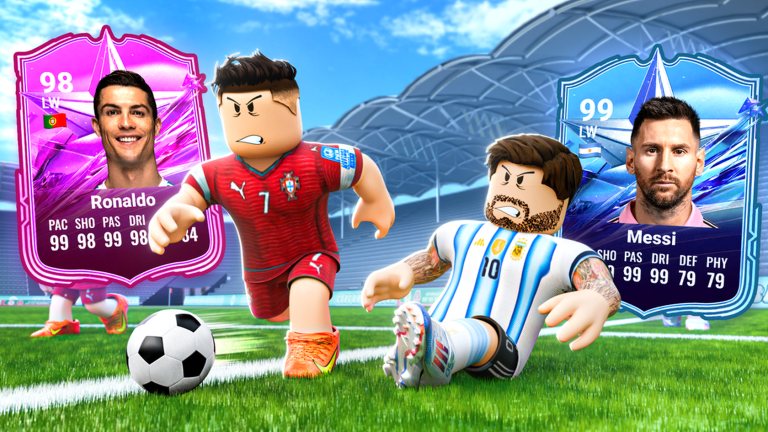
Soccer Card Draft! on Roblox has evolved into a true social experience with Update 18. While building your squad solo is fun, the most rewarding gameplay comes from teaming up in Group Drafting or competing in Cup Tournaments. This guide covers everything you need to know about the multiplayer and social features, from finding teammates to mastering role division and cooperative trading. There are no active codes to redeem right now, but our live code widget updates instantly when new rewards drop—bookmark this page to stay ahead.
Overview of Social and Multiplayer Systems in Update 18
Update 18 introduced revamped social features that change how you play together. The core multiplayer modes are Group Drafting (up to 4 players draft from a shared pool, trading picks in real time), Cup Tournaments (bracket-style events with tiered rewards), and the Trade Hub where you can swap cards with anyone. A brand-new addition is the Shared Bench, which pools unused cards from all group members, allowing substitutes during tournaments. These systems reward communication—teams earn Team Spirit points for cooperative actions like successful trades or helping a teammate, unlocking exclusive cosmetics and temporary OVR boosts. The update also tweaked the tier list, making some cards stronger in specific roles, so collaboration is key to building a balanced squad.
How to Find or Form a Group
To jump into group content, use the in-game Group Finder from the main menu. You can filter by skill level, tournament type, or language to find compatible teammates. The official Soccer Card Draft! Roblox group and Discord server are also full of active players looking for groups. If you prefer to assemble your own team, invite friends from your Roblox friends list or send a message in the game’s chat. Before starting a draft, communicate roles: decide who will focus on defense, midfield, or attack. Using voice chat (like Discord) makes trading and strategy decisions much smoother. To avoid mismatch in OVR, check each member’s top cards—balanced teams perform better in Cup Tournaments.
Role Division and Team Composition Tips
A winning group draft requires each player to specialize. A typical team setup includes:
- Goalkeeper and Defenders: One player prioritizes high-defense cards and saving abilities.
- Midfielders: Focus on stamina and passing to control the game’s tempo.
- Forwards: Aim for high-attack cards and finishing skills.
During the draft, communicate to avoid overlapping picks. For example, if someone grabs a top-tier forward, others can pick midfielders that boost attack stats through synergy bonuses like “Link-Up Play.” Update 18 introduced new Captain Cards that grant team-wide buffs—make sure your captain aligns with your formation (e.g., a defensive captain for a 5-3-2). Use the in-game OVR tool to preview team chemistry before confirming picks.
Trading and Cooperative Mechanics Explained
Group Drafting lets you trade cards with teammates before the match starts. If you pull a duplicate, offer it to someone who needs it—they can trade you a card from a position you lack. Outside drafts, the Trade Hub allows you to list cards or search for specific ones. In Cup Tournaments, the Shared Bench automatically collects unused cards from all team members, giving you extra options for substitutes during a tournament run. This encourages building a deep squad where each player covers different card types. Team Spirit points accumulate when you successfully trade or help a teammate, unlocking rewards like Reroll tokens (which let you redraw the entire team pool) and Refresh tokens (which pull new players into the draft). These tokens are essential for improving your squad without using premium currency.
Solo Alternatives for Group Content
If you prefer to play alone or can’t find a group, Update 18 offers robust solo modes. Solo Drafting pits you against AI opponents, simulating group dynamics with bots that make realistic picks. It’s perfect for practicing team composition and learning card synergies. Solo Tournaments let you compete against other individual players, though rewards are generally lower than group events. The Trade Hub is fully accessible solo, so you can trade cards to complete collections or upgrade your team. Keep an eye on special limited-time events that sometimes offer solo-friendly challenges with exclusive rewards. Solo players can still earn Team Spirit points by participating in community challenges announced in the game’s social channels.
Frequently Asked Questions
Q: What is Group Drafting and how do I start?
A: Group Drafting is a mode where up to 4 players draft from a shared pool of country-year teams, trading picks in real time. To start, use the Group Finder or invite friends from your Roblox friends list. Communicate roles beforehand for the best team chemistry.
Q: How do Team Spirit points work and what do they unlock?
A: Team Spirit points are earned by cooperative actions like trading cards, helping teammates, or winning together in group modes. They unlock exclusive cosmetics, temporary OVR boosts, and special tokens like Reroll and Refresh tokens that help improve your squad.
Q: Can I play Cup Tournaments solo?
A: Yes. Solo Tournaments allow you to compete against other individual players, but rewards are typically smaller than group tournaments. For practice, Solo Drafting against AI is also available.
Conclusion
Soccer Card Draft!’s Update 18 social features make team play more rewarding than ever. Whether you team up for Group Drafting, compete in Cup Tournaments, or trade cards in the Hub, cooperation pays off with Team Spirit points and better squads. While no codes are active right now, our live code database will update as soon as the developer releases new rewards. Bookmark this guide, join the official community, and start building your dream team with friends!
Active Soccer Card Draft! Codes (October 2026)
No verified active codes yet for Soccer Card Draft!; 2 unverified codes are being tracked.