Why Most Players Sleep on Turbo Soccer's Hidden Systems
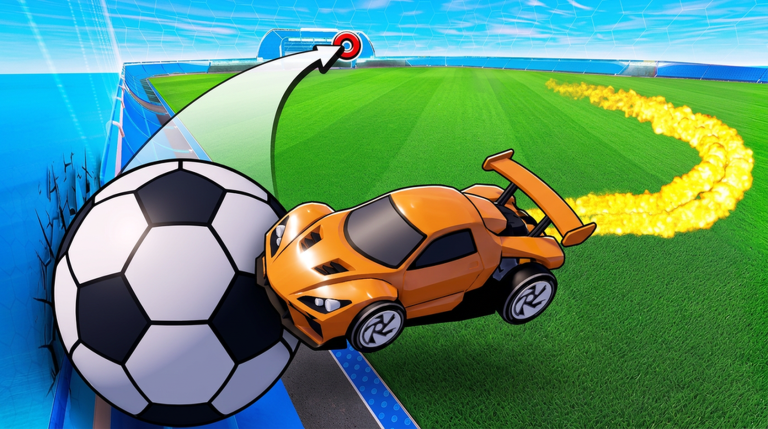
Turbo Soccer : Beta 1.0 is a car soccer experience on Roblox built by developer zDashi, and it already sits at roughly 7.8 million visits according to a community wiki snapshot taken in October 2026. On the surface it looks simple: you drive into a giant ball, compete in matches, and try to score. Under the hood there are several quieter systems that separate players who slowly rank up from players who climb leaderboards fast.
Those systems are Credits earned from play, a customization layer of skins, wheels, decals, and boosts, multiple arenas and maps, and a settings menu most players open exactly once and never touch again. This guide focuses on how those pieces interact so you can turn casual driving into deliberate progression.
The Settings Button Is More Important Than You Think
The settings button sits at the bottom of the screen once a match loads. Most players only ever use it for one purpose. But the settings panel is also where the controls and input behaviour live, and Turbo Soccer supports three genuinely different input setups: WASD plus mouse on PC, on-screen controls on mobile, and a compatible controller on console.
The hidden value here is input consistency. A player who switches between mobile on-screen buttons and a controller mid-session rebuilds muscle memory every single session. Pick one input method and stay on it. PC players should also confirm the mouse camera behaviour feels right inside settings before their first competitive match, because camera control is what lets you line up a ball touch instead of just bumping into it.
Credits Are the Real Progression Currency
Playing matches earns Credits and rewards, and those Credits are what unlock exclusive cars and items plus the customization options for skins, wheels, decals, and boosts. This matters because the customization layer is not purely cosmetic in practice: unlocking boosts and new cars changes how your vehicle feels on the ball, which changes your touches in matches.
Smart farming route: treat every match as a Credit run first and a win attempt second while you are still unlocking. Play full matches rather than leaving early, since leaving cuts short the Credit payout window you already spent time earning. Stack that with the leaderboard incentive, because climbing ranks and farming Credits happen through the same activity. You are being rewarded twice for the same minutes.
Team Play Multiplies Your Touches
Turbo Soccer lets you play with friends and build a team, and this is one of the most underused progression tools in the game. Solo queue often produces ball hogs, which means one player chases the ball across the entire arena while the rest of the team contributes almost nothing.
The fix is pre-made teams with assigned roles. Designate one player as the primary ball driver, one as the back rotation, and one as the support who plays the second ball. Because arenas and maps differ, rotation discipline matters more than mechanical flash. A player who stays back and covers the goal mouth generates more useful touches than a second attacker who double commits.
How to Use Different Arenas to Your Advantage
Matches use different arenas and maps, and each one rewards different driving lines. In wider arenas, the long rotation is king: swing wide, pick up speed, and strike the ball on the approach instead of dribbling it in tight. In tighter layouts, quick short touches win, because a heavy hit just bounces off a wall and hands possession back.
Write down which arenas feel bad for you. That shortlist is your practice queue. Focusing on your two weakest arenas raises your floor far more than grinding the one you already dominate.
Common Mistakes That Stall Your Rank
- Ignoring the settings panel: leaving input and camera behaviour at defaults when a tweak would fix your touches.
- Ball chasing in a team match: two players on the same ball means nobody is defending.
- Skipping customization unlocks: new cars, boosts, and wheels change vehicle behaviour, not just looks.
- Leaving matches early: you cut off your own Credit earning for the time already invested.
- Never playing different maps: one-arena specialists collapse when the rotation changes.
Frequently Asked Questions
Q: What is Turbo Soccer : Beta 1.0 - Car Soccer?
It is a Roblox car soccer experience by zDashi where you take the field, play competitive matches, climb leaderboards, and rank up while earning Credits and unlocking cars and items.
Q: Which controls does Turbo Soccer : Beta 1.0 support?
PC players use WASD and the mouse, mobile players use the on-screen controls, and console players can use a compatible controller. Consistency with one input method is recommended.
Q: How does progression work in Turbo Soccer : Beta 1.0?
Playing matches earns Credits and rewards, which unlock exclusive cars and items plus customization for skins, wheels, decals, and boosts, while leaderboard ranking tracks your competitive standing.
Conclusion
Turbo Soccer : Beta 1.0 rewards players who read its systems instead of just driving at the ball. Lock your input method in settings, farm Credits by finishing matches, rotate properly with a pre-made team, and deliberately practice your weakest arenas. Do that for a few weeks and the leaderboard stops looking out of reach.
Active Turbo Soccer : Beta 1.0 Codes (October 2026)
1 verified code available for Turbo Soccer : Beta 1.0; 3 unverified codes are being tracked.