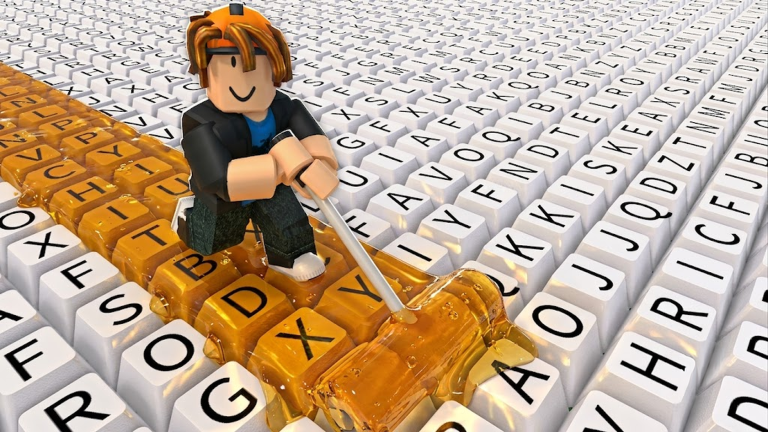
Paint My Keyboard! is a Roblox incremental game where your only job is to paint keys, earn cash, and buy upgrades that paint faster. The difference between a slow grind and a fast climb comes down to one number: payback time. The fan-made calculator at paintmykeyboard.net uses a simple formula: income per minute equals roller speed times cash per key times paint multiplier. Every upgrade you buy has a cost and a projected income gain. Dividing the cost by the gain gives you the payback time in minutes. The upgrade with the shortest payback time is almost always your best next purchase, even if a bigger multiplier looks more exciting.
The Main Route Options: Roller, Paint, or Expansion
Every run of Paint My Keyboard! forces you to choose between four upgrade paths. Understanding these options is the key to building a fast cash route.
- Roller upgrades: These affect how many keys you paint per stroke. Roller speed makes your painting action faster, while roller width lets you paint multiple columns at once. Both have short payback times in the early game because they directly increase your core action.
- Paint tiers: Better paints multiply the cash earned per key. They look great, but they are expensive and often have long payback times if you buy them too early.
- Keyboard expansion: Adding more keys gives you more to paint, but it does not increase your efficiency unless your roller can cover the new area quickly.
The optimal route is not a fixed path. It changes based on your current CPM and your upgrade levels. The payback time calculator tells you exactly which option is undervalued at any moment.
When to Run the Roller Speed Route
In the first 30 minutes of a new save, roller speed is almost always the best route. Community guidance and the tool's quick payback check both point to the same conclusion: faster rollers pay for themselves quickly because they increase the number of painting actions you complete per minute. If your income is around $750 per minute and a faster roller upgrade costs an amount that pays back in 6.7 minutes, that is an efficient buy. Do not skip it to save for a paint tier.
After three roller speed upgrades, your painting rate will jump. This is the moment to consider a width upgrade. Width lets you paint multiple columns in one pass, which multiplies your speed by the number of columns covered. A single width upgrade can have a payback time under three minutes when your speed is already high.
When to Switch to the Paint Tier Route
Paint tiers are the "shiny" upgrades in Paint My Keyboard!. They add multipliers to your cash per key, but they cost a lot of cash. The general rule is to only buy a paint tier when your current CPM is at least 20% of the paint cost. If a paint upgrade costs 4,000 cash and you earn 800 CPM, the payback time is five minutes, which is worth taking. If your CPM is below 200, buying that same paint would lock your progress for 15 minutes or more.
The calculator labels paints as "avoid" or "consider" based on your stats. Trust that label. Paints are best used as a mid-game route after your roller upgrades have pushed your CPM into a comfortable range.
When to Expand Your Keyboard Route
Keyboard expansion adds more keys, but it is only valuable if your roller can actually keep up. Expanding too early leads to a wide keyboard that you cannot paint efficiently, which slows your cash flow. A good rule is to wait until you have at least three speed upgrades and two width upgrades. Another guideline is to expand only when the new keys increase your CPM by at least 15%.
Use the expansion analyzer on the fan hub to compare the cost of adding keys against the expected CPM gain. If the payback time for expansion is longer than the payback time for a roller upgrade, skip the expansion and buy roller instead.
Comparing the Routes Side by Side
Here is a practical way to think about the three main route options:
- Roller speed and width are the early and mid-game workhorses. They have the shortest payback times and should dominate your purchase list until your CPM reaches the thousands.
- Paint tiers become efficient once your CPM is high enough that the multiplier pays back within five to ten minutes. They are the "big swing" route, not the steady route.
- Keyboard expansion is a late-game route. It extends your run length, so it needs to be paired with strong rollers or you will just have more unpainted keys.
The best players do not commit to one route forever. They re-run the payback time check after every purchase. Because the game's metrics change as you upgrade, the correct route can shift from roller speed to width to paint and back again within a single session.
Common Route Mistakes
The most common mistake is buying upgrades randomly. The second most common is ignoring the calculator and chasing cosmetic keyboard colors. Cosmetic purchases do not affect CPM and should never be part of a farming route. Another trap is buying paints too early because the multiplier looks appealing. Always check the payback time before committing. Finally, do not expand your keyboard until your roller can cover the new keys efficiently. The expansion tab in the calculator exists specifically to prevent this mistake.
FAQ
Q: How do I read the payback time number on the Paint My Keyboard calculator?
A: The calculator divides the upgrade cost by the income it adds per minute. A payback time of five minutes means the upgrade will pay for itself after five minutes of painting. Anything under eight minutes is usually worth buying. Longer payback times are only acceptable for paint tiers that multiply all future income.
Q: Should I always buy the upgrade with the shortest payback time?
A: Yes, in the early and mid game, the shortest payback time is the safest route. Later, you may want to take a longer payback on a paint tier because it boosts your CPM permanently. The calculator can show you both the payback time and the long-term gain so you can compare.
Q: When is keyboard expansion actually worth it in Paint My Keyboard!
A: Expansion is worth it when your current CPM is high enough that the new keys increase your income by at least 15%. It is also worth it after you have three roller speed upgrades and two width upgrades. Use the expansion analyzer in the fan hub to confirm the payback time before spending cash.
Final Thoughts
Paint My Keyboard! is a game about making smart purchases. The payback time calculator turns that decision into a clear route. Focus on roller upgrades early, add paint tiers when your CPM supports them, and expand your keyboard only when your rollers can handle the new space. Run the numbers after every purchase and your cash flow will compound faster than players who buy on impulse.
Active Paint My Keyboard! Codes (September 2026)
No verified active codes are available right now for Paint My Keyboard!.