Why Private Servers Are Key to Optimization in OC NPC Playground
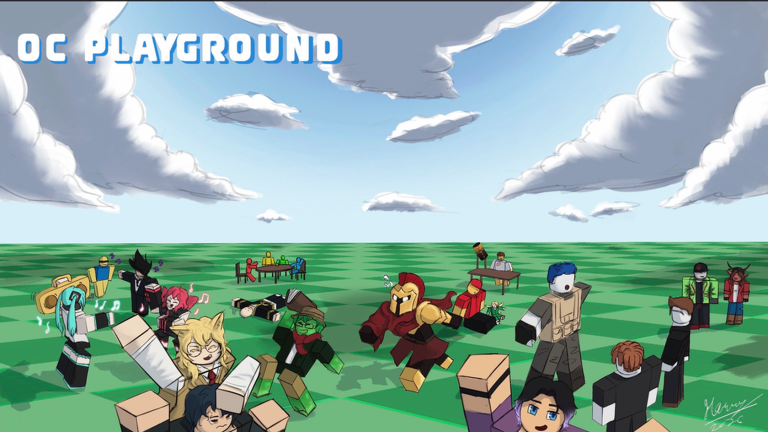
OC NPC Playground is a Roblox experience where you build original characters and release them as NPCs that interact with others. To optimize your sessions, focusing on private servers is essential, as the game heavily encourages their use. Private servers provide a stable environment where you can control interactions, reduce lag, and avoid the chaos of public lobbies. This guide breaks down specific strategies to make the most of private servers, along with tips for efficient OC creation and NPC interactions.
Setting Up and Managing Private Servers
Hosting a private server is the first step toward optimized play. From the official game page, private servers are strongly recommended for the best experience. When you create a private server, you can invite friends or play solo, ensuring that NPC interactions occur without external interference. To set one up, navigate to the server tab on the Roblox game page for OC NPC Playground and select the option to create a private server. Once active, you can customize server settings to enhance performance, such as limiting the number of NPCs spawned simultaneously to prevent lag.
A key tip for private server optimization is to schedule sessions during off-peak hours. Since public servers can become crowded, private servers allow you to avoid performance dips. For example, if you notice lag in public lobbies, switching to a private server immediately stabilizes gameplay. Additionally, use private servers to test new OCs before introducing them to public interactions, ensuring that their descriptions and behaviors align with Roblox guidelines.
Efficient OC Creation with Pronouns and Relationships
Optimizing your original character creation process saves time and improves NPC interactions. The recent update added pronouns and relationship statuses, which are crucial for defining how characters view and interact with others. When using the Create button on the top left, start by setting these attributes early. For instance, assign pronouns like he, she, or they to give your NPC clear identity, and define relationship statuses such as friend or rival to guide automatic interactions.
To avoid violations, keep character descriptions straightforward and understandable. If your NPCs refuse to speak in public servers, it may be due to confusing or intense lore. Optimize by writing brief backstories that focus on key traits. For example, instead of a lengthy history, use the relationship status feature to imply connections, which reduces the risk of breaking guidelines. This approach not only streamlines creation but also makes interactions smoother.
Spawning and Interaction Strategies for Maximum Effectiveness
Once your OC is ready, spawning it strategically optimizes interaction outcomes. Use the Spawn button to release your NPC into the server. Optimal spawning involves timing it when the server is not overcrowded. In private servers, you can control this by spawning one NPC at a time and observing how it interacts with others. Read NPC behavior by watching for movement patterns, such as when they walk up to each other but do not speak, which often indicates a description issue.
Etiquette is vital for optimized sessions. In crowded servers, avoid spamming the Spawn button, as this can cause lag and disrupt interactions. Instead, space out spawns and let NPCs interact naturally. For game-specific examples, consider using the relationship statuses to create predefined interactions. If you set two NPCs as friends, they may collaborate more effectively, leading to richer role-playing scenarios without manual input.
Performance Optimization for Mobile and Low-End PCs
To ensure smooth gameplay across devices, apply performance tweaks derived from game mechanics. Reduce lag by limiting the number of active NPCs in your session. In private servers, this is easier to manage since you control the environment. Avoid spawn spam, which is a common cause of slowdowns. For mobile players, use landscape mode and adjust touch controls via the Controls and UI Reference guide to minimize input lag.
Another optimization is to focus on lightweight OC designs. Complex avatars with many accessories can increase load times. Instead, use simpler appearances and rely on lore and relationship statuses for depth. This not only improves performance but also makes interactions more predictable, as NPCs are less likely to encounter rendering issues during encounters.
Advanced Tips: Lore Writing and Session Planning
For deeper optimization, master lore writing to enhance NPC interactions without performance hits. Write hooks that other NPCs can react to easily, such as simple goals or emotions. Use the private server session planner tool mentioned in guides to outline interaction sequences. For example, plan a session where NPCs meet based on predefined relationships, which automates engaging scenarios.
When comparing options, private servers offer the best control for testing lore and interactions, while public servers are better for broad exposure once your OC is optimized. Use private servers initially to refine your characters, then transition to public servers for larger-scale play. This phased approach ensures that your NPCs are ready for any environment.
FAQ: Common Questions on Optimization
Q: How do I host a private server for optimized sessions in OC NPC Playground?
To host a private server, go to the OC NPC Playground game page on Roblox, click on the Servers tab, and select the option to create a private server. Once created, you can invite friends or adjust settings to control NPC spawn limits, which helps reduce lag and improve interaction quality.
Q: Why are my NPCs not speaking in public servers, and how can I optimize this?
NPCs may refuse to speak if their descriptions violate Roblox guidelines or are too confusing. Optimize by simplifying lore and using the pronoun and relationship status features in the Create menu to define interactions clearly. Test in a private server first to ensure NPCs behave as intended before going public.
Q: What are the best performance tweaks for mobile play in OC NPC Playground?
For mobile optimization, use the Mobile Play Guide tips: switch to landscape mode for better controls, and reduce the number of active NPCs in your session to prevent lag. Also, avoid complex OC designs and rely on basic avatars with lore-driven interactions for smoother performance on low-end devices.
Conclusion: Optimizing Your OC NPC Playground Experience
Optimizing OC NPC Playground revolves around leveraging private servers for control, efficient OC creation with pronouns and relationships, and strategic spawning to enhance interactions. By focusing on these areas, you can enjoy smoother sessions, reduce lag, and ensure your NPCs engage effectively with others. Whether you are a new player or returning, applying these game-specific tips will elevate your gameplay in September 2026 and beyond.
Active OC NPC Playground Codes (October 2026)
No verified active codes are available right now for OC NPC Playground.